
How I Booked Lufthansa First Class with Points (And How You Can Too)

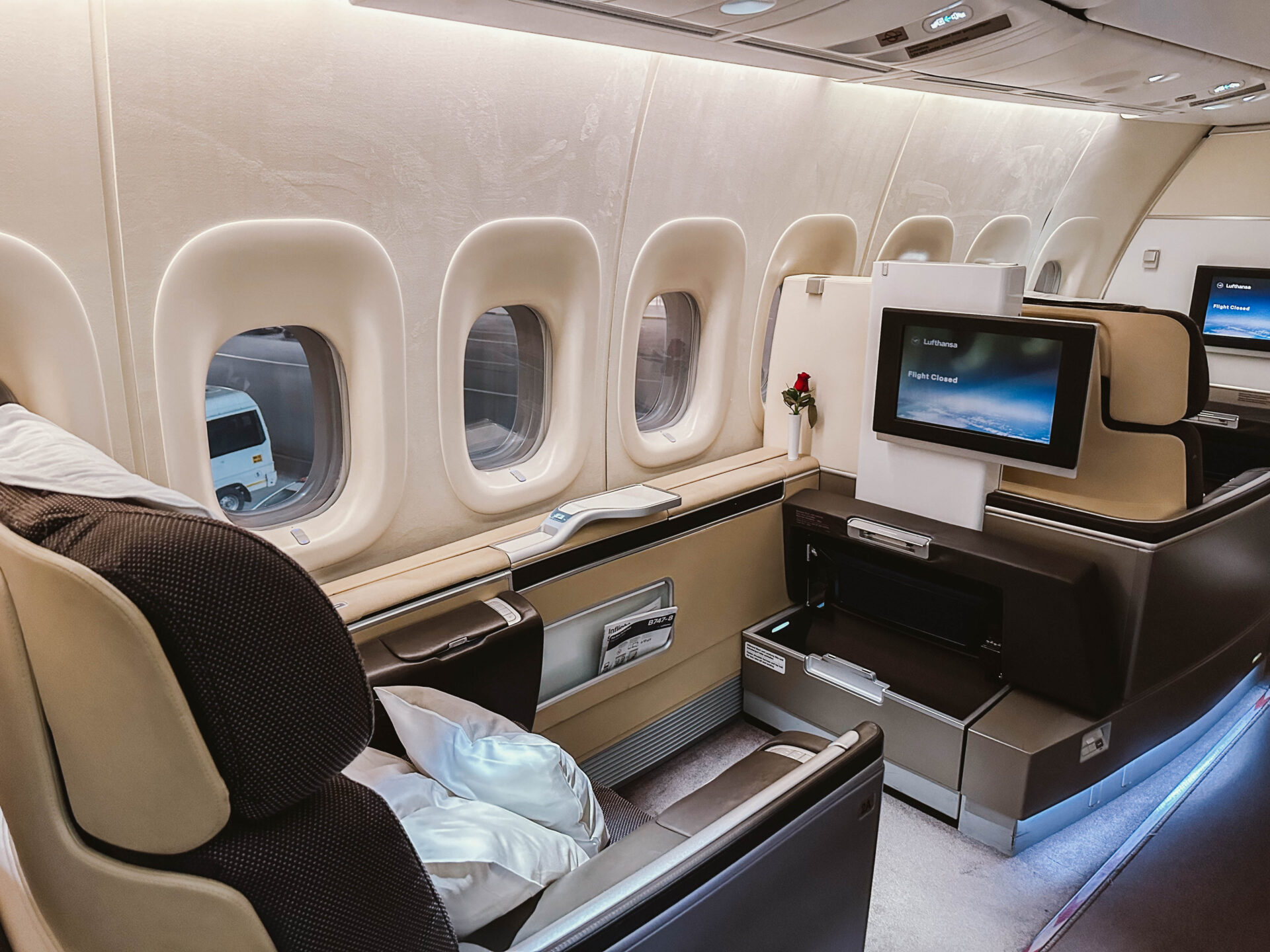
I flew Lufthansa First Class and had one of the most surreal travel experiences of my life: Porsche ride to the aircraft, caviar service at 40,000 feet (which I declined because #veggielife), and a fully lie-flat seat for 20 hours.
And the best part? I didn’t pay cash for any of it.
This flight has been on my bucket list for years—not just for the luxury, but because it’s one of the best high-value redemptions out there if you know how to book it with points. It took me weeks of research, obsessive chart-watching, and some serious nerves to finally pull the trigger.
👉 But here’s the catch: Lufthansa First Class award availability is not for the faint of heart. It’s last-minute, elusive, and requires flexibility.
That’s why this guide is for travelers who are already comfortable with points and miles and are ready to take things to the next level. If you’ve booked business class before and want to score one of the most aspirational redemptions in award travel, this post is going to show you exactly how to book Lufthansa first class with points.
You’ll learn:
- When to book Lufthansa First Class using points
- Exactly which tools I used (and how to set them up)
- Whether to use Aeroplan or LifeMiles—and how I decided
- And the step-by-step process I followed to lock in two seats from India to the US

Want to earn enough points to fly Lufthansa first class? I highly recommend opening the Venture X card. You’ll earn 75,000 bonus miles, get lounge access, and you can easily offset the annual fee with the $300 travel credit.
👉 Ooh! Tell Me More
The Best Time to Book Lufthansa First Class with Points

Lufthansa award flights are typically released to partner airlines within a few days of departure.
Unless you’re sitting on a pile of Miles and More points (Lufthansa’s loyalty program), you’ll need to be flexible with your travel plans and be prepared to book your ticket at the last minute. Don’t worry you don’t need to have Lufthansa miles to snag a first class ticket.
But here’s the thing: just because first-class seats are still available last minute doesn’t mean Lufthansa will release those seats for you to book with points. I learned this the hard way a few years ago when I kept seeing first-class seats on Google Flights up to the day of departure but couldn’t find them available to book with points.
I was so confident I’d be flying a first class flight home but I ended up snagging a last-minute seat in Lufthansa Business Class instead. Not a bad consolation prize!
How to Find Availability and Book Lufthansa First Class

Let’s get into it. I promise to keep this as straightforward as possible because I know how overwhelming points and miles can be. You shouldn’t finish reading this and think, Wait… how do I actually do this? Or you know, slam your laptop closed in frustration.
This is the exact process I used to book both of my Lufthansa First Class flights. You’ll see me mention a tool called seats.aero a lot in this post.
This post is not sponsored by them. I just seriously love using this tool and think it is the easiest way to book Lufthansa’s first class.
Step 1: Make Sure You Have Points That Transfer to Aeroplan or Lifemiles

As Lufthansa is a member of Star Alliance, you can find and book availability through Star Alliance partners.
There are three main ways to book Lufthansa First Class: Avianca LifeMiles, Aeroplan Points, and United MileagePlus.
However, United isn’t one of the best ways unless you’re sitting on a ton of United points you’re dying to use. For example, a Boston to Frankfurt flight costs 90K points on Aeroplan but a whopping 140K on United, so let’s just cross United Airlines off the list
That leaves LifeMiles and Aeroplan. So which one will you book through? Well, it depends on which route you are flying.
You’ll do your research to know more in the next step.
For now, ensure you have a credit card that is a transfer partner to Aeroplan and/or LifeMiles to keep your options open.
My shortlist of recommendations:
- Capital One Venture X
- Capital One Venture Rewards
- American Express Platinum
- American Express Gold Card
I personally transferred miles from my Capital One Venture X account because I had stockpiled the miles for this exact purpose.
Step 2: Time to do some research
For this step, you’ll need to create an account on Seats.aero. There’s a free version and a $9.99/month pro version. While you don’t technically need the paid account, I highly recommend it, especially for step three.
I use this tool all the time, and it’s worth every penny for how much time it saves me when searching for award redemptions. Yes, I am a tiny bit obsessed with it.
Quick disclaimer: If you’re new to points and miles, keep in mind that Seats.aero doesn’t show every single redemption opportunity. You’ll still need to double-check availability directly with airlines. But for the purpose of booking Lufthansa First Class, this tool will get you most of the way there.
Once you’re signed up, navigate to Tools > Lufthansa First Class Finder.

This chart is a game changer for tracking first class award availability. While it doesn’t show LifeMiles availability and only lists United and Aeroplan, that’s fine because we’re just using it to see what routes have availability. Remember they are all a part of the same alliance so you should be able to book the same seat on LifeMiles.
If that sounds confusing, don’t worry. Just keep reading and it’ll all make sense, I promise.
My Research Process
At the time of writing this post, I saw Lufthansa First Class award availability pop up as early as four days before departure. While flights are typically released within 72 hours of departure, it’s worth checking up to a week in advance just in case.

So, how did I use this tool to book two Lufthansa First Class flights (Bangalore to Frankfurt and Frankfurt to New York) for my husband and me? I became best friends with this award chart.
For about a month leading up to our trip, I checked the chart regularly to spot trends. My goal was to see how frequently availability opened up for flights from India to Germany and Germany to the United States. While availability typically opens only a few days before departure, this exercise helped me figure out:
- Which routes had the most frequent openings: I noticed BLR to FRA appeared every few days, while DEL to MUC popped up less often.
- Which US cities were most common: FRA to JFK, BOS, and ORD showed availability nearly every day.
This gave me confidence that a flight may open up. Remember, if you want to book Lufthansa First class you do need some degree of flexibility. So all I knew was that I needed to get from India to Germany and then to the United States.
I wasn’t picky on which USA city I flew into because I was going to have to buy a flight to my home airport, CLT, regardless.
Of course, there’s no guarantee the exact route you want will open, but tracking availability trends is especially helpful if you’re flexible with your departure or destination airports.
My research helped me convince my husband that it was okay that we didn’t have return tickets home from India. I also reminded him that in our wedding vows he promised to trust me on all things points/miles.

Deciding Between Aeroplan and LifeMiles
Once you have an idea of which route you’re going to take, check both Aeroplan and LifeMiles to see how many points/miles the route usually is. Since your exact dates won’t be open yet because you’re just in the research phase, just check for a flight that is available (usually within the next couple of days) and see how many points it is on both websites.
So for example, based on my research, I knew exactly which flights to watch for and which program (Aeroplan or LifeMiles) to use to get the best value:
- BLR to FRA: Booked with LifeMiles (60,000 miles one-way per person).
- FRA to JFK: Booked with Aeroplan (90,000 points miles one-way per person).
You are not going to transfer any points yet. This preparation just ensures you’re ready to act quickly when availability opens because you already know if you will be booking on Aeroplan or LifeMiles.
Now that you’ve got a handle on your research, let’s move to the next step.
Step 3: Set Up Alerts to Save Time
This step requires a small investment, but trust me it’s worth it. For just $9.99/month, a premium Seats.aero membership will save you from refreshing Aeroplan and LifeMiles around the clock. Instead, you’ll get notifications as soon as availability opens up.
Why Alerts Are Game-Changers
One of the best features of Seats.aero is its customizable alerts. With a premium account, you can also receive instant SMS notifications, while the free version only offers email alerts.
I personally recommend the SMS option. It’s faster, more reliable, and ensures you don’t miss availability for your flight.
We were enjoying a performance at our hotel in India when I got the text that the availability was open and I literally ran to the room to book it.
How to Set Up Alerts

- Choose Notification Type: Select either SMS (pro account only) or email (this is selected by default). I strongly recommend SMS so you can make sure you don’t miss the alert.

- Fill Out Alert Details:
- Enter your desired route(s) and date range
- Add Aeroplan and United as programs to track availability (even if you plan to book with LifeMiles. This is just so you can see when a flight is available)

- Use Advanced Filters (Pro Only):
- Set the minimum number of first class seats you need
- Select Lufthansa as the operating airline to narrow results

Repeat this process for each route you want to monitor. For example, I set up separate alerts for the India-Germany and Germany-USA legs of my trip.
Pro Tip: If your travel date and destinations are flexible, you can skip setting up alerts and use the availability chart from Step 2 instead. But for specific dates and routes, alerts are a game changer.
Step 4: Be Prepared for When Availability Opens
Now that your alerts are set, it’s time to get ready for booking day. Here’s how to make sure you’re fully prepared to act quickly when availability opens up:
1. Confirm Your Alerts
If you’re feeling anxious, double-check your alerts by navigating to Manage Alerts on Seats.aero. This ensures everything is set up correctly so you don’t miss any notifications.
I may or may not have done this dozens of times…

2. Avoid Preemptively Transferring Points
It might be tempting to transfer points ahead of time, but resist the urge. Points transferred to LifeMiles or Aeroplan cannot be reversed, so only transfer once you’ve confirmed availability.
3. Have Everything Ready
Time is of the essence when availability opens up, so make sure you’re prepared:
- Miles and Credit Card: Ensure you have enough points and that your credit card can transfer to LifeMiles or Aeroplan
- Necessary Documents: Have your passport and other booking details on hand
- Accounts Set Up: If this is your first time using Aeroplan or LifeMiles, create accounts in advance and familiarize yourself with the booking process
Pro Tip: Do a few test searches on both platforms to avoid surprises on booking day. While LifeMiles can be a frustrating website, the redemptions are worth the hassle.
4. Know Your Booking Platform
By now, you should have an idea of whether Aeroplan or LifeMiles will give you the best redemption value for your route. Refer back to Step 2 if you’re unsure.
Here’s an example comparing the same flight on both platforms to illustrate the difference:
Air Canada Aeroplan example

Lifemiles example

This step ensures you’re ready to act quickly when your alert comes through, minimizing stress and maximizing your chances of scoring the flight.
Step 5: Once the award opens, transfer your points and book
You just got the alert! Woohoo. Now stay calm and let’s book this thing.
1. Confirm Availability
Before transferring points, double-check that the availability still exists through either LifeMiles or Aeroplan, depending on the program you’re using.
2. Transfer Points to the Correct Platform
Once you’ve confirmed availability, transfer your points to the correct program. Remember, transfers are irreversible, so only do this after you’ve verified the award space.
3. Be Patient While Points Transfer
Most transfers to both LifeMiles and Aeroplan are instantaneous but things can always happen and transfers could take a little longer than expected. If you’re an experienced award ticket booker, you know the drill, maybe grab a drink to help with those nerves.
Our points ended up taking longer than expected and I had a mild panic attack thinking the availability would disappear but thankfully it was still there once the points finally posted.
4. Book Your Flight
As soon as the points appear in your account, book the flight immediately. Don’t wait because you never know who else is trying to jump on that flight and availability can disappear quickly.
Celebrate Your Booking!
You’ve officially booked your Lufthansa First-Class ticket! If this guide helped you snag your ticket, please leave a comment and share your experience. And if you have any questions, feel free to ask. I’d love to help!
✈️ My Points & Miles Toolkit
🧠 Two Cards to Business Class (Free Quiz)
Answer a few quick questions and I’ll match you with the exact two cards that can realistically earn you enough points for your first lie-flat flight.
💳 My Favorite Travel Rewards Credit Cards
The cards I personally use to earn 100,000+ points per year and book lie-flat flights.
🔎 Seats.aero
My favorite award search tool. Quickly see award availability across multiple airlines. Free if you’re searching for a flight up to 60 days in advance. I recommend the pro for up to a year availability.
📬 Thrifty Traveler Premium
Flight deals delivered straight to your inbox (both cash + points). Perfect if you’re flexible and don’t want to spend the time searching for award availability.
🎓 Want the step-by-step system?
If you want to go from 0 to business class in just 90 minutes, check out the self paced course.
Pin this Step by Step Guide to Booking Lufthansa First Class for Later:


